Trivia Madness
- 4.4
- Rating
- 1.00M
- Installs
- Free
- Price
 Analysis by App-foxy
I like trivia games that let me start quickly, answer a few questions, and stop without turning a short break into a major commitment. Trivia Madness, developed by Gimica GmbH, fits that idea well: it is a free trivia game for Everyone, built around answering quiz questions in a light, accessible format. I spent time looking at it from the point of view of someone who wants a simple mental workout rather than a large, complicated game system.
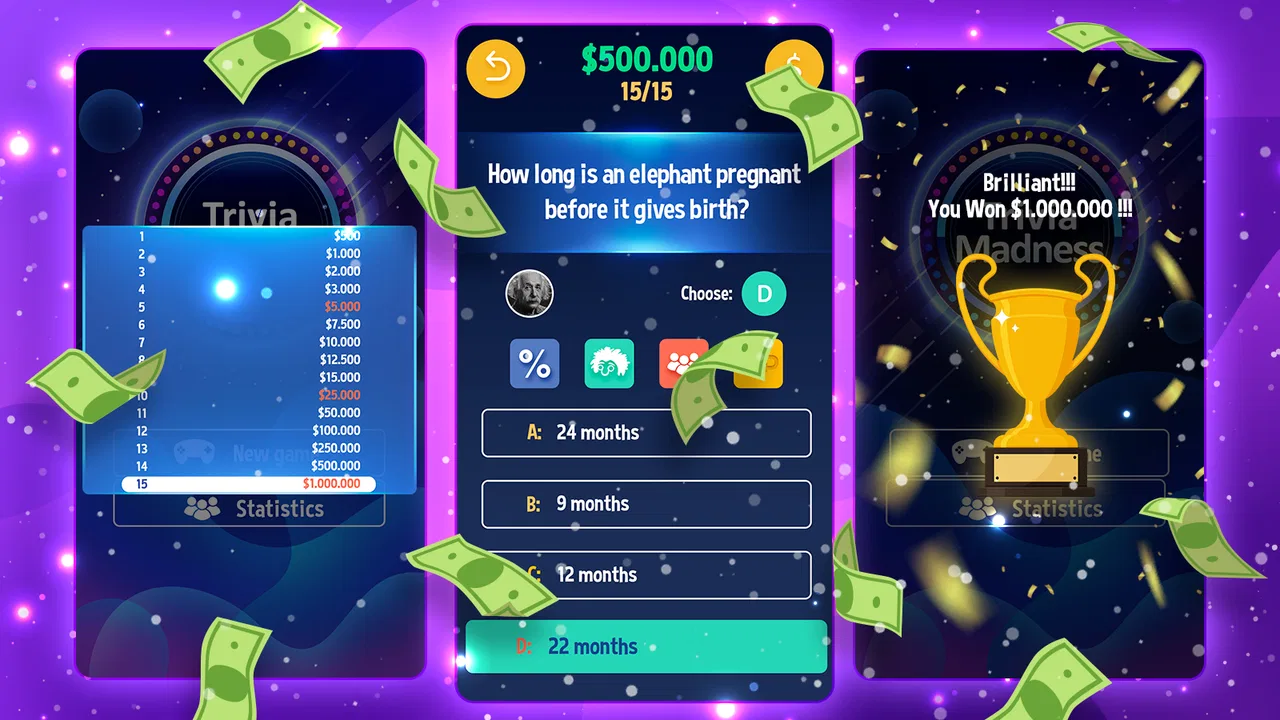
The first thing to understand is its appeal. This is not a deep strategy title or a long-form adventure. Its value is in the question-and-answer loop. You open it when you have a spare moment, read a prompt, make a choice, and see whether your knowledge holds up. That makes it suitable for casual play, family-friendly sessions, and those moments when scrolling through social media feels less satisfying.
My overall impression is that Trivia Madness works best as a quick, low-pressure quiz companion. It is easy to understand, free to try, and broad enough to attract people who enjoy general knowledge challenges. At the same time, anyone expecting a detailed learning tool, a highly competitive quiz platform, or a game with extensive customization should keep expectations realistic.
You May Also Like

 Blood Strike: 2.5 Anniversary
Blood Strike’s Loadouts Turn Every Drop Into a Tactical Gamble
A close look at Blood Strike’s custom loadouts: how fast access to signature weapons reshapes its battle royale rhythm, rewards preparation, and narrows the gap between fights.

 Pandora - Music & Podcasts
Pandora’s Music Is Easy to Start, but Harder to Recover
Pandora’s strength is its low-effort path from a seed to a station. Its weak spot is how much confidence it asks you to place in connection, setup, and quiet recovery.

 8 Ball Pool
 Is Built on Rivalries, Rematches, and Routine
A close look at the rivalries, rematches, shared routines, and unanswered safety questions that turn a quick pool match into a persistent mobile community.

 Samsung Music
’s Quiet Strength Is Playing What You Already Own
Its reach comes less from spectacle than from dependable access to a personal library. That simplicity is both the app’s strongest retention engine and its ceiling.

 AccuWeather: Weather Radar
AccuWeather Review: A Quick, Clear Forecast for Everyday Decisions
For everyday plans, the best forecast is the one you can understand quickly. AccuWeather makes rain timing, radar, and local conditions easy to act on, with a few trade-offs.

 Hill Climb Racing
Why Hill Climb Racing Still Turns Crashes Into One More Run
A tiny car, a bumpy hill and one more upgrade: Hill Climb Racing keeps resurfacing because its simple chaos makes every near-miss feel personal.
More From Our News Desk



Where the first session can become confusing
The main friction with a simple trivia game is not usually the questions themselves. It is the uncertainty around what to do first, how much time a round takes, and whether an incorrect answer has meaningful consequences. When I approach a game like this, I prefer to spend a few seconds checking the opening screen rather than tapping quickly and accidentally moving past useful information.
For a new player, the safest approach is to begin with a short session. Treat the first handful of questions as a familiarization run instead of trying to prove your knowledge immediately. Pay attention to how answers are selected, when the game confirms a choice, and how it moves to the next question. That small pause helps avoid a common problem in quiz games: choosing an answer before fully reading the wording.
The wording deserves attention because trivia questions often use qualifiers that change the answer completely. Words such as “first,” “largest,” “usually,” or “not” can turn an apparently obvious choice into a trap. My practical tip is to read the entire question once, identify the exact thing it is asking, and only then compare the options. This is more useful than rushing simply because the game feels casual.
Another point of friction is expectation. A store summary can make a trivia title sound like a broad collection of fun questions, but the experience may feel repetitive if you play for a long stretch. I would use Trivia Madness in short bursts and judge it on that basis. Its natural rhythm is a few minutes of attention, not necessarily an all-evening session.
The game has attracted a substantial audience, with more than a million installs and an average rating of 4.5 from roughly thirty-five thousand ratings. Those figures suggest that the basic concept connects with many players, but they do not guarantee that every question style will suit every person. Trivia preferences are personal: one player may enjoy broad general knowledge, while another may want specialist subjects or a more structured learning path.
What to check before blaming the game
If the opening experience feels awkward, I would first check the basics. Make sure the game has finished installing, launch it again after a failed start, and confirm that the device is running a compatible system. Trivia Madness supports Android 7.0 and later, so an older phone should be checked before spending time troubleshooting the game itself.
I also recommend closing other demanding apps before starting a session on an older device. A quiz game should not require elaborate preparation, but a crowded device can make any app appear slower than it really is. Restarting the app after a temporary freeze is a reasonable first step. If the problem happens only once, I would not treat it as evidence that the whole game is unreliable.
Keep the installation source consistent as well. If you move between devices, reinstalling the official version rather than copying an old package is the cleaner route. This avoids mixing an outdated installation with current app files. The current version is 1.3.0, and keeping the installed copy current is sensible when a game behaves unexpectedly.
There is also a simple screen-reading check that is easy to overlook. If text or answer choices seem cramped, try changing the device’s display settings back to a standard size temporarily. Extreme font or display scaling can affect how comfortably a question fits on screen, even when the game itself is working normally. I would make that adjustment only as a test, then restore the setting if it does not help.
For a child or family member using the game, I would do the first session together. The Everyone content rating makes it approachable for a broad audience, but an adult can still explain how to read questions carefully and how to handle an answer that turns out to be wrong. That is especially useful for younger players who may interpret every mistake as a failure rather than part of the quiz.
A better workflow for short quiz sessions
My preferred workflow is simple: start with a clear goal, play a small number of questions, and stop while the game still feels fresh. If I am using it during a break, I avoid opening it when I need to concentrate on another task. Trivia encourages mental switching, and even a short round can make it harder to return immediately to work or study.
A useful everyday scenario is a waiting room or a short commute. Instead of opening a game that demands a long uninterrupted session, I can use Trivia Madness for a compact burst of general-knowledge play. If an interruption arrives, I would finish or leave the current question only when the interface makes that safe; I would not repeatedly tap through screens just to save a few seconds.
For a family session, take turns reading the question aloud and let each person answer before discussing it. This changes the game from solitary tapping into a small conversation starter. It also exposes a trade-off: the app is convenient for individual play, but the social value comes mostly from how players use it rather than from any elaborate group setup.
One of the less obvious benefits of this approach is that it separates knowledge from speed. If you answer too quickly, you may be measuring reaction habits rather than trivia knowledge. I would deliberately slow down for questions that contain several similar choices. Then, after an incorrect answer, I would ask myself whether I missed a fact or simply misread the wording. That distinction makes each session more useful.
When a round does not continue as expected, avoid repeatedly pressing the answer area. Rapid tapping can make it difficult to tell whether the app has responded, whether the screen is changing, or whether a touch was registered twice. Wait briefly, then try one deliberate tap. If the screen remains unchanged, close and reopen the game instead of creating a chain of accidental inputs.
If a session is interrupted by a phone call, notification, or accidental exit, return to the game calmly rather than assuming progress has been lost. The safest recovery is to see what screen appears after reopening and continue only when the question state is clear. I would not rely on a quiz app as a place to store important notes or personal study progress; its strength is casual play, not formal record keeping.
When the problem may be outside the app
Not every failed launch or slow response comes from Trivia Madness. Device storage, background activity, a weak connection, or a temporary operating-system issue can all affect how an app behaves. I start by checking whether other apps are also slow. If several unrelated apps are having trouble, the game is probably only one symptom of a broader device problem.
A nearly full phone can create strange behavior during installation or updates. Freeing a little space, restarting the device, and trying again is more sensible than repeatedly tapping the install button. If the game opens but the phone becomes unusually warm or sluggish, I would close background apps and give the device a short rest before testing again.
Network conditions can also confuse troubleshooting. If the game needs to load something and the connection is unstable, switching between a reliable Wi-Fi network and mobile data may reveal whether the issue follows the connection. I would make one change at a time so the result is understandable. Changing several settings at once makes it impossible to know what actually helped.
Notifications and battery-saving behavior can interfere with any short-session game, particularly on older phones. If the app repeatedly stops when the screen locks or when another app opens, check the device’s general battery and background restrictions. I would avoid granting unusual access or installing unrelated “booster” tools just to fix a simple quiz issue. Basic device maintenance is safer and usually enough for first-line troubleshooting.
There is a difference between a technical problem and a design preference. If I dislike a particular question category, find the pace too quick, or want more explanation after every answer, that does not necessarily mean the app is malfunctioning. It means the game may not match my preferred trivia style. Recognizing that difference prevents wasted troubleshooting and makes the download decision more honest.
Who will enjoy it, and who should choose something else?
I would recommend Trivia Madness to people who want a free, approachable quiz game that can fit into small gaps in the day. It is a good match for casual players, families looking for an easy question game, and anyone who enjoys testing general knowledge without learning a complex control scheme. The Everyone rating also makes it a comfortable option to consider for mixed-age use, with normal adult supervision for younger children.
I would be more cautious about recommending it to someone studying for a formal exam. A general trivia game can be entertaining and may expose you to facts, but it is not a replacement for a syllabus, flashcards, or a subject-specific learning app. If your goal is vocabulary retention, professional certification, or detailed feedback on mistakes, a dedicated study tool will usually be a better choice.
It may also disappoint players who prefer competitive matchmaking, long-term progression, or precise performance tracking. Traditional quiz alternatives often focus on one of those areas: a classroom-style tool may offer structured learning, while a multiplayer trivia title may emphasize live competition. Trivia Madness is the better fit when convenience and quick questions matter more than a sophisticated social or educational framework.
Another trade-off is replay value. A trivia game can remain enjoyable as long as the questions feel varied and your mood is right, but no general quiz can guarantee that every subject will interest you. I would not judge it by whether every question feels personally relevant. Instead, ask whether you enjoy the process of discovering what you know, what you have forgotten, and what you guessed correctly for the wrong reason.
My practical verdict after using it
Trivia Madness, released on June 28, 2022, is a straightforward entry in the Android trivia category. Gimica GmbH has kept the central idea easy to grasp: open the game, face quiz questions, and enjoy a small challenge. The free price removes the biggest barrier to trying it, and the current version, 1.3.0, gives Android users a clear version reference when checking their installation.
I would install it for short, relaxed sessions rather than expecting a complete educational platform. My best tip is to read carefully, tap deliberately, and use the first session to understand the rhythm instead of chasing a perfect result. If the game appears stuck, check the device, installation, storage, and connection before deciding that the app is at fault.
Trivia Madness is worth trying when you want accessible quiz entertainment with very little setup. It is not the right choice for every trivia fan, especially those seeking deep explanations, specialist revision, or a highly competitive multiplayer structure. For the reader who simply wants a free question game for a spare moment, though, it offers a sensible balance of convenience and mental engagement.
My final recommendation is to keep the sessions short and judge the experience over several separate attempts. That gives the game room to show whether its question mix suits you without turning a casual download into a commitment. If you enjoy the basic answer-and-check loop, it can become a pleasant habit for waiting time, family play, or a quick break from more demanding apps.
FAQs for Trivia Madness
01What is Trivia Madness and how does it work?
Trivia Madness is an engaging quiz app available on both Android and iOS that challenges users with a wide variety of trivia questions across multiple categories. Users can compete individually or with friends, earning points for correct answers and advancing through increasingly difficult levels. The app also offers daily challenges and leaderboards to track progress.
02Is Trivia Madness free to play, and are there any in-app purchases?
Trivia Madness is free to download and play, offering a wide range of trivia questions without any initial cost. However, the app includes optional in-app purchases, such as hint packs and ad removal, which enhance the gaming experience. Users can enjoy the full range of features without spending money, but these purchases can provide additional convenience.
03What types of trivia categories are available in Trivia Madness?
Trivia Madness boasts a diverse selection of categories, including history, science, pop culture, sports, and more. This variety ensures that players of all interests can find something enjoyable. The app is regularly updated with new questions and categories, keeping the content fresh and challenging for returning users.
04Can I play Trivia Madness offline, or do I need an internet connection?
Trivia Madness requires an internet connection to download new questions and sync progress with the server. However, once questions are downloaded, users can continue playing offline, making it convenient for gaming on-the-go. To access daily challenges and leaderboards, a connection is necessary.
05How does Trivia Madness ensure fair play and prevent cheating?
Trivia Madness employs several measures to ensure fair play, including random question selection and time limits for answering each question. The app also monitors gameplay patterns to detect any suspicious activity. These features help maintain a competitive environment and ensure that all players have a fair chance to succeed.
Pros
- Engaging and diverse question categories.
- User-friendly interface with intuitive navigation.
- Multiplayer mode enhances social interaction.
- Regular updates keep content fresh.
- Rewards system incentivizes frequent play.
Cons
- Occasional ads can interrupt gameplay.
- Some questions may repeat too often.
- Requires internet for all features.
- Limited customization options available.
- Leaderboard can be skewed by in-app purchases.

Trivia Madness
Gallery